How to Sign Up for QuantMan and Start Algo Trading
Getting started with QuantMan is simple. This blog explains how to sign up using your broker, automatically access the 7‑day free trial, and explore subscription plans. With secure broker integration and powerful Algo Trading tools, QuantMan makes it easy to build, test, and deploy strategies.
Algo Trading is transforming the way traders approach the markets. With platforms like QuantMan, traders can automate strategies, backtest ideas, and deploy them live without technical barriers. Whether you're a beginner exploring algorithmic trading in India or an experienced trader looking for advanced tools, signing up to QuantMan is the first step toward building reliable trading systems.
This blog explains how to create your QuantMan account, connect your broker, access the free trial and choose the right subscription plan to begin your Algo Trading journey.
Supported Brokers for Algo Trading with QuantMan
QuantMan integrates seamlessly with over 40+ leading brokers in India, making it easy to connect your existing trading account. Broker integration is secure, fast, and follows industry‑standard protocols. Once connected, you can deploy strategies directly from QuantMan to your broker account.
Supported brokers include:
Angel API, Fyers, Zebu, Upstox, Aliceblue, 5paisa, Flattrade, Paytm Money, Goodwill, Bigul, Dhan, Finvasia, IIFL, Nuvama, Rupeezy, SMC Global, Enrich Money, Sharekhan, Kotak Individual, Sky Broking, AC Agarwal, PhillipCapital, Samco, Indira Securities, Fair Invest, Profitmart, Kasat Securities, Groww, Trade Smart, Indiabulls Securities, Jainam Lite, Religare, Bonanza, Arihant Plus, Jainam Broking, Axis Direct, MStock, IIFL Capital, Navia, KBS, Zerodha API.
Steps to Sign Up Using Broker Login
Getting started with QuantMan is simple. Follow these steps to create your account and begin Algo Trading:
1. Open a browser and visit quantman.in.
2. On the homepage, select Login with Broker.
3. Choose your Broker from the supported list.
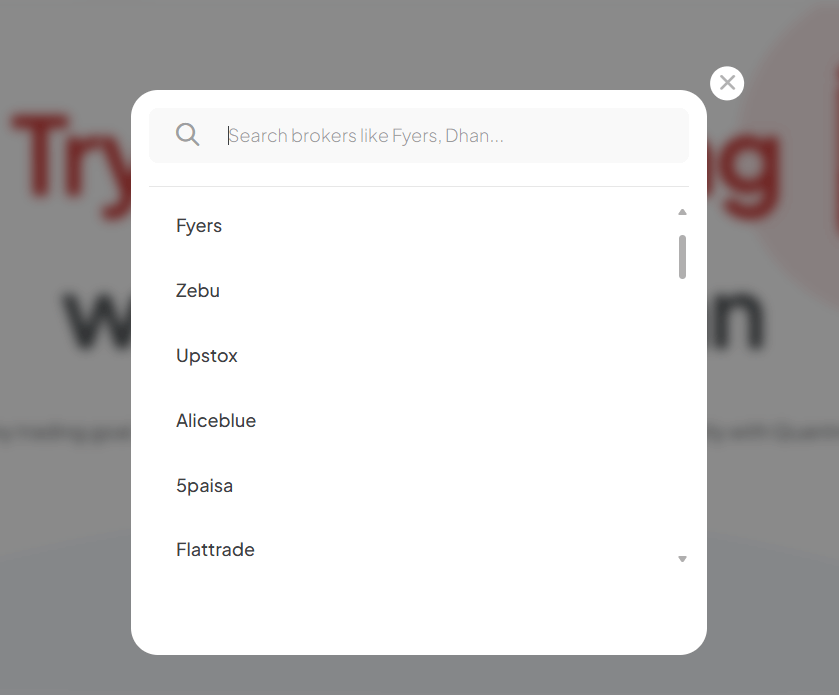
4. Enter your broker credentials and agree to the Terms & Conditions.
5. Provide your mobile number, click Generate OTP, and verify it.
6. Select your preferred language and confirm the Demo option.
7. Once verified, you will be redirected to the QuantMan Dashboard.
Your account is now ready, and you can immediately start exploring QuantMan’s features.
Free Trial Activation
When you sign up using your broker, you automatically receive a 7‑day free trial of the Pro Plan. A confirmation message will appear on your dashboard, giving you access to QuantMan’s full suite of Algo Trading tools.
During the trial, you can:
- Build and test strategies with the strategy builder.
- Run simulations using the backtesting engine.
- Deploy strategies live with broker integration.
- Explore pre‑defined strategies for quick setup.
- Access educational resources to learn algorithmic trading.
Exploring QuantMan and Choosing a Subscription Plan
After your free trial, you can continue using QuantMan by selecting a subscription plan that fits your trading style. Plans are flexible and available in monthly, quarterly, and annual options.
Each subscription includes:
- Strategy builder
- Backtesting engine
- Live deployment tools
- Pre‑defined strategies
- Educational resourcees
Steps to purchase a plan:
To buy the QuantMan subscription plan:
1. Go to the QuantMan home page (https://www.quantman.in/) and click the "Buy a Plan" button in the top-right corner. You can also scroll down to the "Plans" section in your profile.

2. Choose how long you want your plan to last: Monthly, Quarterly, or Annual.
3. If you have a coupon code, type it in the box and click the "Apply Coupon" button. The new price will show up.
4. Pick the plan you want and click the "Order Now" button.
5. If you wish, you can extend the duration and click "Purchase" for the Pro, Premium, or Basic Plan.
Next, select a payment method, fill in your payment details, and complete the payment. After the payment is successful, you will get a confirmation message for your plan.
Note: If you already have a plan, you can switch to a new one without cancelling your current plan. For instance, if you're on a Basic plan and want to upgrade to Premium, select "Extend Now" under the Premium option and finish the payment.
You can upgrade, downgrade, or cancel your subscription anytime. All payments are processed securely.
Conclusion
Signing up for QuantMan is the gateway to professional Algo Trading in India. By connecting your broker, activating the free trial, and exploring subscription plans, you gain access to powerful tools for building, testing, and deploying trading strategies.
Whether you're new to algorithmic trading or scaling advanced systems, QuantMan makes the process seamless, secure, and effective.